
AirTags are incredibly useful for tracking personal items, but the same technology can feel unsettling if you suspect one is hidden in your car without your knowledge. The idea of an unknown device following your movements can raise understandable concerns, making it important to know exactly what to look for and how to respond.
Thankfully, with the right tools and a clear approach, locating an AirTag becomes much easier than it seems. Whether you’re using an iPhone, an Android device, or simply want to do a physical search, knowing how to find an AirTag in your car gives you control, clarity, and peace of mind.
How AirTags Work (And Why They Can Be Hard to Spot)

Before you start searching, it helps to understand how AirTags communicate.
- AirTags rely on Bluetooth and Apple’s vast Find My network.
- They can be detected even if they’re hidden or silent.
- An unknown AirTag moving with you triggers alerts on iPhones and, in some cases, on newer Android devices.
- If left away from its owner for long enough, the AirTag may start beeping automatically.
Because they’re small and easy to hide, you need a combination of digital tools and physical inspection to locate one effectively.
Quick Comparison: Methods to Find an AirTag in Your Car
| Method | Works On | Accuracy | Best For | Tools Needed |
| Play a Sound (Find My) | iPhone | High | Locating a nearby AirTag | iPhone with Find My |
| Precision Finding | iPhone 11+ | Very High | Pinpointing exact location | iPhone with UWB |
| Last Known Location | iPhone | Medium | When AirTag isn’t currently near | Find My app |
| Tracker Detect App | Android | Medium | Detecting unknown AirTags | Android + App |
| Bluetooth Scanner | Android/iPhone | Medium–High | Finding hidden signals | BLE Scanner app |
| Manual Search | Any | Variable | Physically checking hidden spots | None |
| Automatic AirTag Beep | Any | Low–Medium | When tech tools aren’t working | None |
How to Find an AirTag in Your Car Using an iPhone
If you’re an iPhone user, you have the most precise detection tools available.
1. Play a Sound
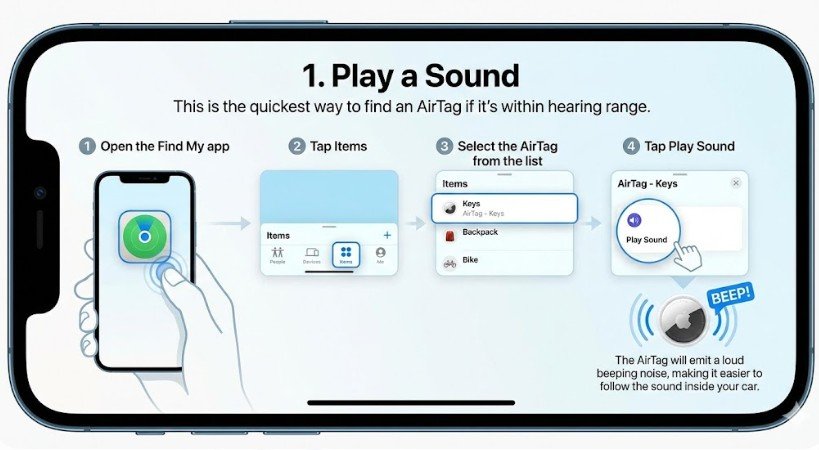
This is the quickest way to find an AirTag if it’s within hearing range.
- Open the Find My app.
- Tap Items.
- Select the AirTag from the list.
- Tap Play Sound.
The AirTag will emit a loud beeping noise, making it easier to follow the sound inside your car.
2. Use Precision Finding
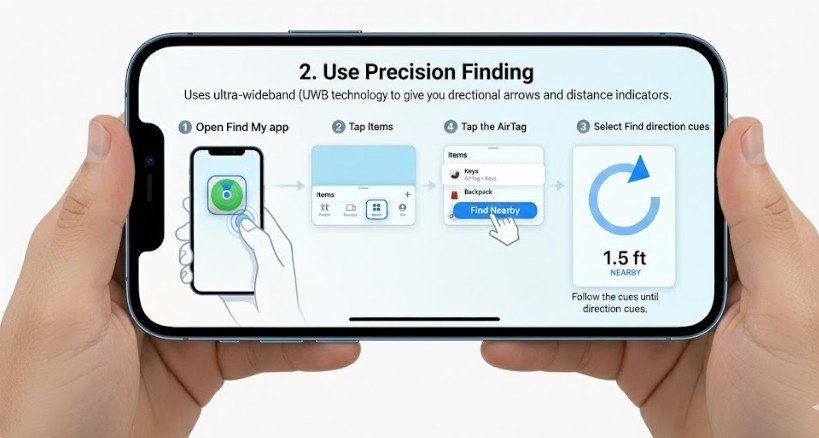
If you have an iPhone 11 or newer, Precision Finding uses ultra-wideband (UWB) technology to give you directional arrows and distance indicators.
- Open Find Me.
- Tap the AirTag.
- Select Find Nearby.
- Follow the on-screen direction cues until the AirTag is located.
This is one of the most accurate ways to locate an AirTag in a vehicle because it guides you directly to the device.
3. Check the Last Known Location
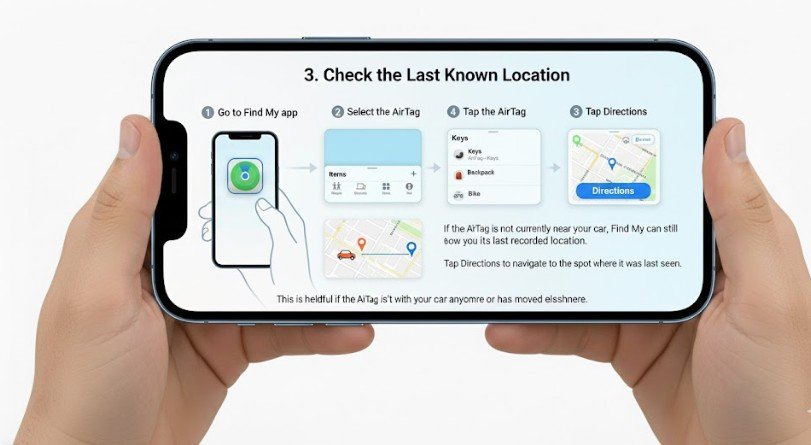
If the AirTag is not currently near your car, Find My can still show you its last recorded location.
- Go to Find My.
- Select the AirTag.
- Tap Directions to navigate to the spot where it was last seen.
This is helpful if the AirTag isn’t with your car anymore or has moved elsewhere.
How to Find an AirTag in Your Car Using an Android Device
Android users don’t have native access to Apple’s Find My network, but there are reliable ways to detect AirTags.
1. Use the Tracker Detect App
Apple released this app specifically for Android users concerned about unknown AirTags.
Steps:
- Download Tracker Detect from the Google Play Store.
- Open the app.
- Tap Scan.
- Wait for the app to detect unfamiliar AirTags.
- If one appears, tap Play Sound to locate it.
Note: Tracker Detect only identifies AirTags that have been separated from their owner for a period of time.
2. Try a Bluetooth Scanner App
If Tracker Detect doesn’t pick anything up, use a third-party Bluetooth Low Energy (BLE) scanner such as:
- BLE Scanner
- LightBlue
- nRF Connect
Once installed:
- Open the app.
- Walk around the car slowly.
- Watch for unknown, stable Bluetooth signals.
- Move closer to see if the signal strength increases, helping you determine the hiding spot.
BLE scanner apps work well because AirTags consistently broadcast Bluetooth signals.
How to Physically Search Your Car for an AirTag
Even with digital tools, a hands-on search is often necessary. AirTags are small, round, and easy to conceal—think coin-sized—so it’s important to check places that are easy to overlook.
High-Probability Locations to Check
Interior
- Under the seats
- Between seat cushions
- Behind seat pockets
- Inside the glove compartment
- Under floor mats
- Inside cup holders
- In storage compartments
- Behind the dashboard edges
- Inside the trunk corners
Exterior
(These are less common but still possible.)
- Wheel wells
- Behind license plate area
- Inside bumper edges
- Magnetic areas under the car (if someone used a holder case)
Use a flashlight to help scan dark or narrow spaces.
Listen for Automatic Beeping
If an AirTag has been away from its owner for 8–24 hours, it may start making a chirping sound on its own. This sound is intermittent but can help you locate it when you’re not getting alerts on your phone.
Stand inside your car with the engine off and listen closely. Check again after a few minutes if you don’t hear anything immediately.
What to Do If You Find an AirTag in Your Car
Finding an unfamiliar AirTag can be alarming, but it’s important to respond calmly and safely.
1. Disable It Immediately
You can disable an AirTag by removing its battery:
- Press down on the stainless-steel back.
- Rotate counterclockwise.
- Lift the cover.
- Remove the battery.
This stops all tracking activity instantly.
2. Do Not Destroy the Device
Police may need it as evidence.
3. Report Suspicious Activity
If you suspect stalking or malicious intent:
- Visit a police station
- Share the AirTag’s serial number (printed inside the cover)
- Provide screenshots and timestamps
- Explain the situation clearly
Law enforcement can help identify the owner and take necessary action.
How to Prevent Unauthorized AirTag Tracking
- Keep your iPhone or Android device updated.
- Watch for unknown tracking alerts.
- Regularly check your car for hidden devices.
- Avoid lending your car to untrusted individuals.
- Enable Google’s “Unknown Tracker Alerts” if you’re on Android 12 or newer.
Staying aware is the best way to stay protected.
FAQs: How to Find an AirTag in My Car
1. Will my iPhone alert me if an AirTag is tracking my car?
Yes. iPhones automatically alert you if an unknown AirTag travels with you for a period of time.
2. Can Android phones detect AirTags automatically?
Newer Android devices can receive unknown tracker alerts through Google’s safety updates, but detection is not as seamless as on iPhone.
3. Can an AirTag track me if I remove its battery?
No. Removing the battery disables tracking immediately.
4. How long before an AirTag starts beeping on its own?
Typically between 8 and 24 hours after being separated from its owner.
5. Can AirTags track a car in real time?
AirTags update location based on Apple devices nearby, not constant GPS, so tracking is not truly real-time—but it can still be incredibly accurate.
6. Where are AirTags most commonly hidden in cars?
Under seats, in seat pockets, in the trunk area, or under floor mats.
Final Thoughts
If you’ve been wondering how to find an AirTag in your car, the key is combining the right technology with a thorough physical check.
Whether you’re using an iPhone’s Precision Finding, an Android BLE scanner, or simply inspecting hidden spots by hand, these methods ensure you can locate any AirTag confidently and safely.
Once you give the signal, I can also create a shorter version, a carousel script, or a YouTube video script based on this article.