If you’ve ever heard your AirTag start beeping unexpectedly, it can be confusing—especially if everything seems to be working normally.
As someone who regularly troubleshoots AirTags and Apple’s Find My ecosystem, I can assure you that AirTags never beep without a reason.
The sound is a built-in feature designed to keep your items safe, warn you of issues, or protect others from unwanted tracking.
In this guide, I’ll explain the real reasons your AirTag is beeping, what each alert typically means, and the fastest ways to stop the noise.
What Causes an AirTag to Start Beeping?
AirTags use sound alerts to notify you about activity, status changes, or security concerns. Here are the most common reasons:
Each alert is designed to be instantly recognizable, helping you understand what’s happening without checking your phone. The sound patterns make it easy to tell whether your AirTag needs attention or a quick reset.
Unwanted Tracking Alerts: The Anti-Stalking Feature
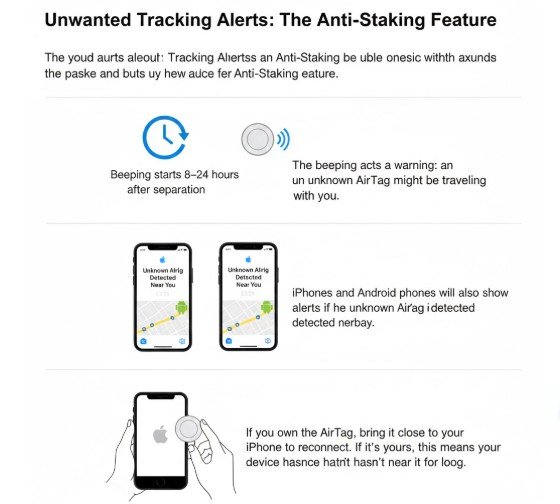
Apple designed AirTags to prevent people from using them for unwanted tracking. If an AirTag is separated from its owner and starts moving with someone else, it will eventually begin to beep.
The beeping acts as a warning: an unknown AirTag might be traveling with you.
Key points:
- Beeping usually starts 8–24 hours after separation from the owner.
- iPhones and Android phones will also show alerts if an unknown AirTag is detected nearby.
- If you own the AirTag, simply bring it close to your iPhone to reconnect.
If the AirTag is yours, this alert usually means your device hasn’t been near it for too long.
Low Battery Warning
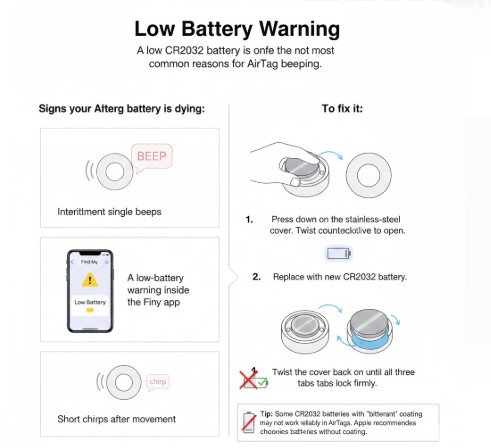
A low CR2032 battery is one of the most common reasons for AirTag beeping.
Signs your AirTag battery is dying:
- Intermittent single beeps
- A low-battery warning inside the Find My app
- Short chirps after movement
To fix it:
- Press down on the stainless-steel cover.
- Twist counterclockwise to open.
- Replace with a new CR2032 battery.
- Twist the cover back on until all three tabs lock firmly.
Tip: Some CR2032 batteries with a “bitterant” coating may not work reliably in AirTags. Apple recommends choosing batteries without this coating.
Lost Mode Is Enabled
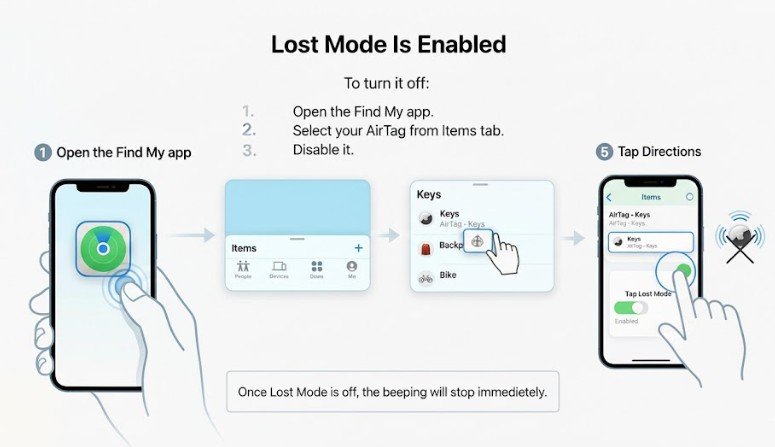
If you accidentally activated Lost Mode inside the Find My app, your AirTag will begin to beep so someone can help locate it. Many users enable Lost Mode during troubleshooting and forget to disable it later.
To turn it off:
- Open the Find My app.
- Select your AirTag from the Items tab.
- Tap Lost Mode.
- Disable it.
Once Lost Mode is off, the beeping will stop immediately.
Out of Bluetooth Range for Too Long
AirTags are designed to stay close to the device they’re paired with. If your AirTag has been out of Bluetooth range for an extended period, it may beep to signal that it’s no longer connected.
This often happens when:
- Leaving an item behind (keys, bags, wallets)
- Storing luggage far from your phone
- Forgetting the AirTag in a vehicle or office drawer
To stop the beeping:
- Bring the AirTag close to your iPhone again.
- Open Find My to confirm it reconnects.
Battery Not Installed Correctly
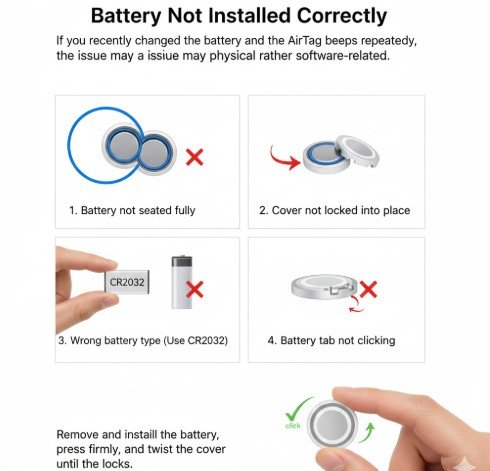
If you recently changed the battery and the AirTag beeps repeatedly, the issue may be physical rather than software-related.
Common mistakes:
- Battery not seated fully
- Stainless steel cover not locked into place
- Wrong battery type
- Battery tab not clicking into position
Remove and reinstall the battery, press firmly, and twist the cover until it locks.
What Each AirTag Sound Usually Means

While Apple doesn’t publish an official sound chart, consistent testing and teardown reports help us understand what typical AirTag audio alerts indicate.
Below is a quick comparison table for clarity.
Quick Comparison Table: What Your AirTag Beeping Means
| AirTag Sound | Likely Meaning | How to Fix It |
| Single short beep | Reconnected or battery installed | No action needed |
| Repeated chirping | Unwanted tracking alert | Bring AirTag near your iPhone |
| Slow intermittent beeps | Low battery | Replace CR2032 battery |
| Continuous spaced beeps | Lost Mode is active | Turn off Lost Mode in Find My |
| Multiple quick beeps | Battery misalignment or pairing issue | Reinstall the battery properly |
How to Stop an AirTag From Beeping
Below are step-by-step solutions for each situation. Identify the alert that matches your AirTag and follow the corresponding fix.
If Your AirTag Belongs to You
- Bring the AirTag close to your iPhone.
- Open Find My.
- Select your AirTag.
- Check:
- Battery status
- Lost Mode toggle
- Connection status
Most beeping stops automatically once the AirTag reconnects.
If The Battery Is Low
- Remove the back cover by pressing and twisting.
- Replace with a new CR2032 battery.
- Close the cover until all tabs lock.
- Confirm battery level in Find My.
If Lost Mode Was Enabled Accidentally
- Go to Find My.
- Select the AirTag.
- Turn off Lost Mode.
- Confirm the AirTag stops beeping.
If the AirTag Doesn’t Belong to You
If you hear an AirTag beeping but you don’t own one, Apple provides a built-in safety process.
- Hold the AirTag near your phone.
- Scan it using NFC.
- View the owner’s contact details (if available).
- If you feel unsafe, follow instructions to disable it by removing the battery.
When to Consider Resetting Your AirTag
If your AirTag continues to beep even after troubleshooting, resetting it may help.
Here’s how to do a full AirTag reset:
- Remove the battery cover.
- Take out the battery.
- Reinsert the battery and press until you hear a beep.
- Repeat this process five times until you hear a different tone confirming the reset.
- Reconnect it in Find My like a new device.
A reset fixes:
- Software glitches
- Stuck alerts
- Pairing issues
- Incorrect battery notifications
How to Prevent AirTag Beeping in the Future
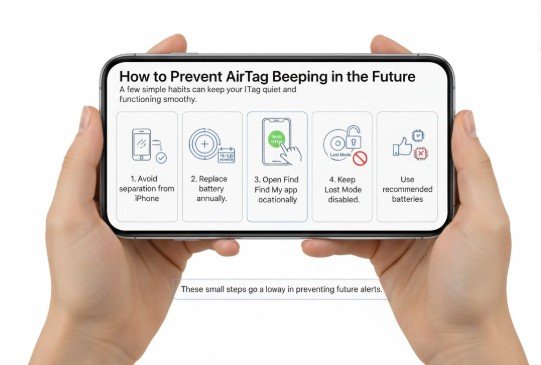
A few simple habits can keep your AirTag quiet and functioning smoothly.
- Avoid leaving your AirTag far from your iPhone for long periods.
- Replace the battery every 10–12 months.
- Open the Find My app occasionally to ensure full connectivity.
- Keep Lost Mode disabled unless absolutely needed.
- Use recommended battery brands without biturrant coatings.
These small steps go a long way in preventing future alerts.
FAQs About Why AirTag Is Beeping
1. Why is my AirTag beeping even when I’m near it?
This can happen if Lost Mode is turned on, the battery is incorrectly installed, or the AirTag is briefly failing to connect. Open Find My to verify settings.
2. Does an AirTag beep when it’s low on battery?
Yes. Low battery results in periodic single beeps and a notification inside Find My. Replace the CR2032 battery to stop the alert.
3. How long before an AirTag beeps for unwanted tracking?
Usually between 8–24 hours depending on separation time, movement, and Apple’s current safety rules.
4. Can I disable AirTag beeping permanently?
No. Apple does not allow disabling safety alerts, tracking alerts, or low-battery notifications.
5. Why does my AirTag beep after replacing the battery?
This often happens if the cover isn’t fully locked or the battery didn’t click into place. Reinstall the battery carefully.
Final Thoughts
AirTags beep for only a handful of reasons, and each one serves a real purpose—either for your security or someone else’s. Whether it’s low battery, Lost Mode, anti-stalking alerts, or a simple connection issue, the steps above will help you identify and silence the alert quickly.
Understanding why your AirTag is beeping is the easiest way to keep your items safe, your device running smoothly, and your tracking experience stress-free.